Fine as is
A list of what may stay as it is, plus detection for the tokens that behave that way, so those segments stop being false positives.
Drop a bilingual file, or run the check inside the editor your translators already have open. Rule checks settle what is certain. An AI model reads every segment against its source; on Premium it reads the file as a document, ten segments at a time. On paid plans it then reads the whole file start to end for a term translated two ways or headings in two styles. Your file comes back as it arrived.
On jobs a partner translation agency delivered: 16 real errors Xbench missed (12 jobs) and 22 Verifika missed (10 jobs).
Get started with 50 free templates.
Legen Sie mit kostenlosen Vorlagen los.
50 is in the source and missing from the target. Same file, same finding, no AI model involved.
The AI read the finding and agrees. The label sits on the finding. The reviewer still decides.
Legen Sie mit 50 kostenlosen Vorlagen los.
The rules answer the questions that have a right answer, instantly and the same way every time. Then an AI model reads every translated segment, including the ones the rules passed, for the errors no rule can express.
Tags, numbers, placeholders, URLs, empty targets, locked segments, do-not-translate terms, glossary, punctuation, spacing, expansion and locale formats. Instant and reproducible, with every rule set to Critical, Major, Minor or off in your profile.
After the rules, an AI model reads every translated segment, including the ones they passed, for mistranslation, omission, addition, terminology and register. Your text is handed to the model as data, so a sentence in your file cannot give the model instructions. It runs on a model your workspace allows.
The AI gives its opinion on each critical or major rule finding that needs a reading, such as a term, a number, a length or a checklist hit: it agrees, disputes it or cannot tell. A check with one right answer, such as a missing tag or placeholder, stands as found, same file, same finding. A second model checks a dispute on a mechanical check, such as a number, a unit, a term or a client rule, before it stands. The opinion is shown on the finding as a label: AI agrees or AI disputes. When it cannot tell, there is no label. A disputed finding stays in the report and counts at half weight in the score until the reviewer decides. The reviewer decides and the decision is recorded.
Findings with the rule that fired, the exact words in source and target, the AI's opinion and the suggested fix. HTML to read, Excel or CSV for a spreadsheet. Marked Ignored or Fixed in the report, with the reason kept, and signed off by a person.
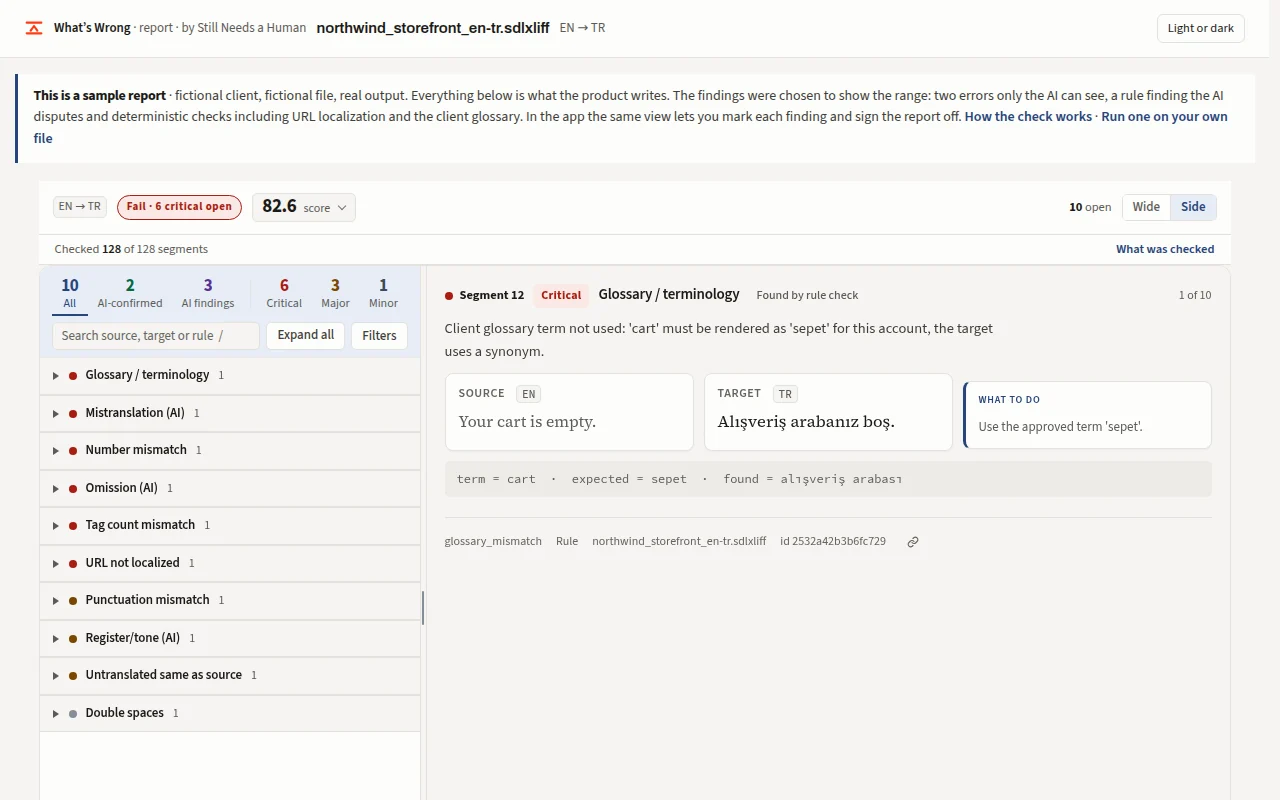
Every check below is a rule: same file, same result, no AI model involved. You decide which of them can fail a delivery.
Set the cosmetic checks to Minor and a delivery fails on product names, numbers, placeholders, tags and missing targets alone.
Coming from Xbench? What each one catches
Coming from Verifika? What each one catches
A profile is the rule set for a client, a locale or a content type. Clone a default, or build one from a client's folder and approve what it found, then hand it to the person who owns the account.
A list of what may stay as it is, plus detection for the tokens that behave that way, so those segments stop being false positives.
Names that must survive verbatim, plus the localized forms you approved.
Critical, Major, Minor or off. Strict on one account, quiet on another.
Files under a known account folder pick up that account's profile; nobody chooses it by hand.
Each profile has someone responsible, who can edit it even when their role sits below project manager.
Drop a zip of the style guide, glossary, checklist and past files. The builder proposes the profile and shows every line it would write; nothing is saved until a person approves it.
Nobody logs in somewhere new. Pick the way in that matches how the work reaches you.
A browser extension that runs the check on the job the translator has open, in their own session, on the hosts it supports: Phrase, XTM Cloud, Smartling and WorldServer. Insert a fix into your editor in one click.
A Crowdin app with an editor panel and a project report. Crowdin shows the findings for each translation in its editor as a QA check result. A Smartling webhook runs on each published file, and Smartling receives each one as an issue.
Drop a package into a Dropbox folder and the report comes back beside it. Or mail the file to the profile's own address and the report comes back in the same thread. Team and up.
REST with workspace keys and outgoing webhooks, or a check asked for in Claude or ChatGPT through the MCP connector.
What's Wrong reads the bilingual file and reports. A person makes the corrections in the tool they already use, so tags and structure stay intact.
A failed or timed-out run reports segments as not checked, with the reason. It never reports them as passed.
The Free plan runs the full check on it, no card, and hands back the report with every finding, its evidence and the suggested fix. The pricing page has every plan.